처음 DB를 접한것은 학생이던 시절(?) 오라클이었던가
어떤 서버에 접속해서 알수 없는 명령을 내려서 테이블 만들고
테이블에 데이터 입력하고, 삭제하고 .. (CRUD)

그 후 본격적(현업?)으로 써보기 시작한 것은 MySQL 이었던것 같다.
스타트업에 있었던 터라 본의(?) 아니게 그랬던것인지, 오픈소스라는 매력, 오라클에 대한 반감 등 여러요소가 있었던 것 같다.

그러다가 MySQL 이 오라클로 넘어가는 사건이 발생한다.
그 후로는 MariaDB 를 사용하게 되었다.
그 사이 서비스에 사용하는 MySQL 을 PgSQL 에 호환되도록 코드를 리팩토링해서 어! 잘 작동하네 정도로 postgre 를 써본 경험정도

그래서 postgres 에 대한 역사는 드문드문 아는정도
(역사 요약은 여기서 https://news.hada.io/topic?id=10344 )


Postgres는 언제부터 멋있어졌을까 | GeekNews

VC 펀딩도, DevRel 팀도 없이 25년간 천천히 진화함Ingres(UC 버클리, 1970~1985) —> Postgres95 —> PostgreSQLPostgres = "Post Ingres"첫 언어는 SQL도 아닌 QUEL 이었음. SQL 지원은 Postgres95가 출시된 1995년에 추가됨1996

news.hada.io

읽다보면, 드문드문 아! 그랬었지 라는 기억이 난다.

...

언제부터인가 MongoDB 를 필두로 NoSQL 이 유행하던 때 도 있었다.

사실 요즘은 어떤게 핫한지 잘 모른다. 이미 핫했지만, 이제서야 알게 된 것일지도 모르겠다.
아! 요즘 언어로는 힙한 postgres 인가!

DB 관련에는 어떤것들이 있나! https://news.hada.io/topic?id=16365 에서 살펴볼수 있다.


그냥 Postgres 쓰세요 | GeekNews

대부분의 웹 애플리케이션은 지속적인 데이터 저장이 필요하므로, 새로운 애플리케이션을 만들 때 기본적으로 Postgres를 선택하는 것이 좋음왜 sqlite가 아닌가?sqlite는 좋은 DB지만, 데이터가 하나

news.hada.io

사실 한가지에 익숙하다보면, 모든 것을 그 하나로 처리하고 싶은 욕구가 본능인듯 싶다.
나도 MySQL 을 NoSQL 처럼 사용하려 json 타입으로 만들어 사용하기도 한다.

왜! 지금 postgres 에 관심을 갖는지는 사실 supabase 라는 서비스에 있다. https://supabase.com/
요즘 구글 Firebase 대항마(?)로 뜨고 있는 서비스이다.(나온지 얼마되지 않은 듯 한데...)


Supabase | The Open Source Firebase Alternative

Build production-grade applications with a Postgres database, Authentication, instant APIs, Realtime, Functions, Storage and Vector embeddings. Start for free.

supabase.com

이 supabase 가 postgres 기반이라고 한다.
서비스지만, 오픈소스 기반이라 종속되지 않고, 서비스를 이용하다가, 본인서버로 마이그레이션 할수도 있는 듯 하다
물론 그정도로 서비스가 커져야 겠지만.

앱을 만들면서 supabase 를 쓰게 될 듯 하다.
돌아돌아 다시 만나게 된 postgres

이번에는 오래 쓰게 될지, 또 다시 찍먹하고 MySQL 으로 돌아갈지, 같이 쓸지는 모르겠다.

기억에 남기기 위해 포스팅 해본다.

postgres 로 할 수 있는 것들 - https://news.hada.io/topic?id=13231


PostgreSQL로 충분하다 | GeekNews

PostgreSQL을 각 분야에 사용하는 방법에 대한 링크를 정리한 페이지백그라운드잡, 메시지 큐, GIS, Audit Log, 접근 제어, 권한 관리, 검색, 시계열, 그래프 데이터, 외부 데이터, HTTP, API, 이벤트/복제/CD

news.hada.io


반응형

WRITTEN BY
1day1
하루하루 즐거운일 하나씩, 행복한일 하나씩 만들어 가요.
,

지난글에 이어 https://blog.1day1.org/711 스프링 프로젝트에 .pem 인증서를 사용해보자.


letsencrypt 를 좀더 활용해보자. (feat. post_hook)

letsencrypt 를 잘 사용하고 있는데, 주로 개발용으로 사용했다.간단한 사용법은 https://blog.1day1.org/657 에서 확인. letsencrypt 초간단 설치 in ubuntu , nginx (feat. certbot)https 를 사용하는 것은 옵션이 아니

blog.1day1.org

서버에 일반 랜딩페이지용은 nginx 로 사용하고, api 용 서버는 스프링 프로젝트로 구축되어 있다.

스프링프로젝트는 아래 형태로 세팅되어 있다. ( application-prd.properties )

server.contextPath=/myproject
server.address=0.0.0.0
server.port=8443
server.ssl.key-store=/myproject/ssl/myproject.com.pfx
server.ssl.key-store-type=PKCS12
server.ssl.key-store-password=1234567

해당 프로젝트는 내가 구축한 것은 아니고, 수년전 구축된 것을 인수받아 관리하고 있다.
그래서 해당 방식이 최신 방식은 아닐 수 있다. (잘은 모르지만, jks / pkcs12 방식이 주로 쓰이는 듯 하다)
요즘은 application.yaml 파일이 주로 쓰이나?

아무튼 이제 해야할 부분은 letsencrypt 인증서를 스프링에서 쓸수 있는 방식으로 변환하고자 한다.

# cat lets-pem2pfx.sh 
#!/bin/bash

if [ "$2" == "" ]; then
	echo "Usage) $0 {domain} {out-file.pfx}";
	exit;
fi

out_dir=$PWD
domain=$1
out_file=$2
password=123456

cd /etc/letsencrypt/live/$domain

openssl pkcs12 -export \
 -out $out_dir/$out_file \
 -inkey privkey.pem -in cert.pem -certfile chain.pem \
 -passin pass:$password -passout pass:$password

위와 같은 스크립트로 변환해줬다.
처음에는 암호없이 했는데, 스프링프로젝트가 안되서, 다시 암호를 넣고 했다.(원래 정책상 안되는지, 빠뜨린게 있는지는 ??)

다음 단계는 3개월(90일)마다 갱신을 해줘야 하니, 자동화가 필요하겠지.

1) certbot renew
2) convert pem to pfx
3) restart spring project

위 단계로 자동으로 갱신 / 재시작 하는 코드를 만들어야 겠다.(다음에 계속... )

반응형

WRITTEN BY
1day1
하루하루 즐거운일 하나씩, 행복한일 하나씩 만들어 가요.

,

letsencrypt 를 잘 사용하고 있는데, 주로 개발용으로 사용했다.

간단한 사용법은 https://blog.1day1.org/657 에서 확인.


letsencrypt 초간단 설치 in ubuntu , nginx (feat. certbot)

https 를 사용하는 것은 옵션이 아니라 이젠 필수요소인듯 하다. 명령은 2줄이면 될려나? apt install certbot python3-certbot-nginx certbot --nginx -d {도메인} -d {여러개일때 도메인 추가} 나중에 도메인을 추가

blog.1day1.org

좀더 프로덕션에 사용해 볼까 하는 생각에 좀더 자동화를 해보려고 알아보고 있다.

# cat /etc/letsencrypt/renewal/yoursite.com.conf 
# renew_before_expiry = 30 days
version = 1.11.0
archive_dir = /etc/letsencrypt/archive/yoursite.com
cert = /etc/letsencrypt/live/yoursite.com/cert.pem
privkey = /etc/letsencrypt/live/yoursite.com/privkey.pem
chain = /etc/letsencrypt/live/yoursite.com/chain.pem
fullchain = /etc/letsencrypt/live/yoursite.com/fullchain.pem

# Options used in the renewal process
[renewalparams]
authenticator = nginx
installer = nginx
account = ef9ksjdkfjskd3sdf5sdf3s23gf12g452t4g232ad2a
manual_public_ip_logging_ok = None
pre_hook = systemctl stop nginx
post_hook = systemctl start nginx
server = https://acme-v02.api.letsencrypt.org/directory

3개월(90일) 후에 재인증(?)을 해줘야 한다.
위 설정에서 pre_hook / post_hook 부분에서
systemctl start nginx 로 하면 nginx 가 정상으로 실행되지 않는 현상이 있다.

실행 체크는 certbot renew --dry-run 으로 해보면 된다.(아래와 비슷한 에러)

2024/08/04 01:40:02 [emerg] 22375#22375: bind() to 0.0.0.0:80 failed (98: Address already in use)
2024/08/04 01:40:02 [emerg] 22375#22375: bind() to 0.0.0.0:443 failed (98: Address already in use)
2024/08/04 01:40:02 [notice] 22375#22375: try again to bind() after 500ms
2024/08/04 01:40:02 [emerg] 22375#22375: bind() to 0.0.0.0:80 failed (98: Address already in use)
2024/08/04 01:40:02 [emerg] 22375#22375: bind() to 0.0.0.0:443 failed (98: Address already in use)
2024/08/04 01:40:02 [notice] 22375#22375: try again to bind() after 500ms
2024/08/04 01:40:02 [emerg] 22375#22375: bind() to 0.0.0.0:80 failed (98: Address already in use)
2024/08/04 01:40:02 [emerg] 22375#22375: bind() to 0.0.0.0:443 failed (98: Address already in use)

보통 저런 에러는 nginx 가 실행중이라 start 를 해서 이미 80/443 포트를 사용중이라는 에러
(원인의 예상은 renew 체크시 web 접속이 필요해서 nginx 가 실행중이어야 하는 듯 싶다.)
letsencrypt 인증서버에서 .well-known 서버접속해서 확인하는 듯 하다.

13.214.188.135 - - [04/Aug/2024:01:44:32 +0900] "GET /.well-known/acme-challenge/G_jAk7TzDtYa5B9RRH2-tBY5jvvOkxqsz8ZLEgnV5_8 HTTP/1.1" 200 87 "-" "Mozilla/5.0 (compatible; Let's Encrypt validation server; +https://www.letsencrypt.org)" "-"
18.226.4.132 - - [04/Aug/2024:01:44:32 +0900] "GET /.well-known/acme-challenge/G_jAk7TzDtYa5B9RRH2-tBY5jvvOkxqsz8ZLEgnV5_8 HTTP/1.1" 200 87 "-" "Mozilla/5.0 (compatible; Let's Encrypt validation server; +https://www.letsencrypt.org)" "-"
16.16.94.36 - - [04/Aug/2024:01:44:33 +0900] "GET /.well-known/acme-challenge/G_jAk7TzDtYa5B9RRH2-tBY5jvvOkxqsz8ZLEgnV5_8 HTTP/1.1" 200 87 "-" "Mozilla/5.0 (compatible; Let's Encrypt validation server; +https://www.letsencrypt.org)" "-"
16.16.94.36 - - [04/Aug/2024:01:44:33 +0900] "GET /.well-known/acme-challenge/II0XkQ6LIjFkl_jGey5q98RyZd231HG5Xs6amebSOjM HTTP/1.1" 200 87 "-" "Mozilla/5.0 (compatible; Let's Encrypt validation server; +https://www.letsencrypt.org)" "-"
18.226.4.132 - - [04/Aug/2024:01:44:42 +0900] "GET /.well-known/acme-challenge/II0XkQ6LIjFkl_jGey5q98RyZd231HG5Xs6amebSOjM HTTP/1.1" 200 87 "-" "Mozilla/5.0 (compatible; Let's Encrypt validation server; +https://www.letsencrypt.org)" "-"
54.191.171.212 - - [04/Aug/2024:01:44:42 +0900] "GET /.well-known/acme-challenge/II0XkQ6LIjFkl_jGey5q98RyZd231HG5Xs6amebSOjM HTTP/1.1" 200 87 "-" "Mozilla/5.0 (compatible; Let's Encrypt validation server; +https://www.letsencrypt.org)" "-"

에러가 발생해서 다음처럼 수정하였다. (nginx 중지 안해도 되니 pre_hook 은 주석처리 )

#pre_hook = systemctl stop nginx
post_hook = systemctl restart nginx

일단 dry-run 으로 해보니 정상적이었다.(실제 90일 후에 어떨지 살펴봐야겠지)


다음 활용은 letsencrypt 인증서 (.pem) 를 spring boot  의 ( .pfx ) 파일로 변환해서 사용해봐야겠다.

반응형

WRITTEN BY
1day1
하루하루 즐거운일 하나씩, 행복한일 하나씩 만들어 가요.

,

현재 개발중인 플러터 앱의 기능에 이상현상(안드로이드쪽)이 있어서, 비교할 겸 리액트 네이티브로도 비슷하게 구성하고자 한다.
(아마도 메인은 플러터 , RN 은 보조 혹은 학습 단계가 될 듯 하다.)

리액트 네이티브 세팅 후에 차이점(혹은 추가점) 을 정리한다.

기본 리액트 네이티브 설치 등은 SKIP

리액트 네이티브 - 프로젝트 내에서 실행.

# npx @react-native-community/cli doctor

Common
 ✓ Node.js - Required to execute JavaScript code
 ✓ npm - Required to install NPM dependencies
 ✓ Watchman - Used for watching changes in the filesystem when in development mode
 ● Metro - Metro Bundler is not running

Android
 ✓ Adb - Required to verify if the android device is attached correctly
 ✓ JDK - Required to compile Java code
 ✓ Android Studio - Required for building and installing your app on Android
 ✓ ANDROID_HOME - Environment variable that points to your Android SDK installation
 ✓ Gradlew - Build tool required for Android builds
 ✓ Android SDK - Required for building and installing your app on Android

iOS
 ✓ Xcode - Required for building and installing your app on iOS
 ✓ Ruby - Required for installing iOS dependencies
 ✓ CocoaPods - Required for installing iOS dependencies
 ● ios-deploy - Required for installing your app on a physical device with the CLI
 ✓ .xcode.env - File to customize Xcode environment

Errors:   0
Warnings: 2

Usage
 › Press f to try to fix issues.
 › Press e to try to fix errors.
 › Press w to try to fix warnings.
 › Press Enter to exit.

처음에는 watchman / adb / ANDROID_HOME 등이 에러 표시가 났다.

watchman 등은 새로 설치.
ANDROID_HOME 은 /Library/Android/sdk 의 패스를 넣어주면 된다.(bash / zsh 등)

metro 도 해결책을 찾아보자.
이건 npx react-native start 로 하면 해결 되는 듯 하다.

ios-deploy 쪽은 당장 iOS 쪽은 만들지 않을 듯 해서 당분간 패스


반응형

WRITTEN BY
1day1
하루하루 즐거운일 하나씩, 행복한일 하나씩 만들어 가요.

,

개발은 오래(?)했지만, 앱은 실질적으로 1년도 안된 듯 하다.

그렇다 보니, 앱 출시도 여러가지 시행착오를 겪고 있다.

이번에 지인분 앱을 만들어 주면서, 내 개인(테스트)앱도 만들어 보고 있다.

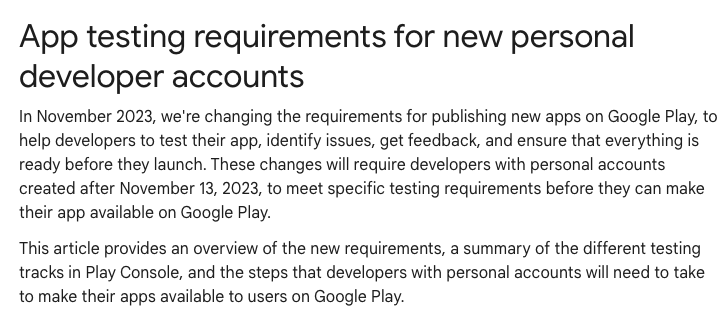
그런데, 개발자계정 만든지 얼마 안되서 이런 장벽도 있다. (프로덕션 출시를 위해서는 비공개 테스트를 해야 한다.)
지인분 계정은 오래전에 만들어서 그런지, 이번에 신규앱 출시할 때 위와 같은 단계는 없다.

관련 안내를 보니 작년에 관련 정책이 생겼나 보다. (개발자 계정이라도 미리 만들어 둘걸...)

기존 계정은 바로 프로덕션 신청(심사요청)을 할 수 있었는데, 신규계정은 비공개테스트 단계를 거쳐야 하나보다.
(아마도 개발자 검증? 을 위한 조치겠지 - 한번 검증을 거치면 다음에는 안해도 되겠지? 매번 앱 출시 마다 해야하지는 않겠지...)


그나저나 테스트 앱 - 버전 올리면서 올리고 있는데.

몇몇 플러터 패키지를 등록하고 올리다 보니 - 보기에는 무시무시한 - 경고 메시지가 보인다.
해당 패키지가 권한 추가 또는 최소OS버전 등으로 인해 설치 가능 기기가 줄어든 듯 싶다.
뭐! 어쩔 수 없는 것이겠지.(그래도 뭔가 씁슬하다-손해보는 듯한?)


반응형

WRITTEN BY
1day1
하루하루 즐거운일 하나씩, 행복한일 하나씩 만들어 가요.

,